
Finding the best IPTV app for Samsung TV is challenging because Samsung uses Tizen OS, a restrictive ecosystem that doesn’t support Android APKs. For a premium experience, you need a dedicated IPTV player—a software shell that allows you to load your M3U playlist or Xtream Codes from a service provider.
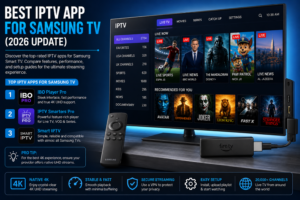
While Tizen is limited, apps like IBO Player Pro and IPTV Smarters Pro currently lead the industry for stability, UI responsiveness, and 4K support on Samsung hardware.
Regarded as the gold standard for Tizen OS due to its sleek interface and fast loading times.
One of the most versatile players globally, offering a comprehensive dashboard for VOD and Live TV.
One of the oldest players available, known for its simplicity.
Pro Tip: To enjoy Native 4K, your provider must stream in UHD. Most apps offer “Upscaled 4K,” which stretches 1080p content to fit your screen without adding real detail.
best iptv app for samsung tv
Many users searching for the “best IPTV app Samsung TV Reddit” find that native apps occasionally crash or lack advanced features like EPG (Electronic Program Guide) customization. This is because Tizen limits background processing.
For those demanding zero buffering and a wider app library, an external device is often superior.
| Feature | Samsung Native (Tizen) | External (Firestick 4K Max/Shield) |
|---|---|---|
| App Availability | Limited to Tizen Store | Full Android/Google Play Store |
| UI Speed | Moderate (varies by CPU) | Very Fast / Optimized |
| Buffering Rate | Higher on Wi-Fi | Lower (due to better SoC) |
| Setup Ease | Direct App Install | Requires HDMI Connection |
| Advanced Players | Limited (No TiviMate) | Full Access (TiviMate, etc.) |
Technical Requirement: Ensure your connection speed is 25+ Mbps for a stable 4K UHD experience.
To eliminate buffering and stuttering:
Ready to experience the ultimate streaming library? Start a Free Trial today to access over 20,000+ channels and a massive 4K VOD collection. For personalized setup assistance on your Samsung TV, Contact Support via WhatsApp now.
Can I install IPTV on Samsung Smart TV? Yes, by downloading a compatible IPTV player app (such as IBO Player or Smart IPTV) from the Samsung App Store and uploading your service provider’s playlist.
Is there a free IPTV app for Samsung TV? Most reputable players offer a short free trial, but the best-performing apps typically require a small one-time activation fee for long-term use.
Is there a free IPTV provider? While some free providers exist, they are usually unstable, low-resolution, and plagued by ads. For 4K quality and stability, a premium subscription is recommended.
Which IPTV works best? For Samsung users, IBO Player Pro is currently the best for performance, while the Amazon Firestick 4K Max (running TiviMate) is the best overall hardware solution.