
Finding the best IPTV application depends entirely on your hardware and how you consume content. Whether you are a sports fanatic requiring zero-latency streams or a movie buff seeking a native 4K interface, the player acts as the bridge between your service provider and your screen. For 2026, the gold standard for power users remains TiviMate IPTV Player, while IPTV Smarters Pro continues to lead for beginners due to its versatility across iOS and Android.
If you are in a rush, use this table to select your player based on your primary needs.
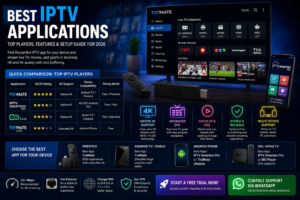
best iptv application
| Application | UI/UX Rating | 4K Support | Device Compatibility | Pricing Model |
|---|---|---|---|---|
| TiviMate | Elite (Cable-like) | Native 4K | Android TV / Firestick | Free / Premium |
| IPTV Smarters Pro | Good (App-like) | Native 4K | All (iOS, Android, PC) | Free / Paid |
| Ibo Player | Great (Modern) | Native 4K | Smart TV / Firestick | Trial / One-time |
| TiviMate (Lite) | Basic | Upscaled 4K | Android Phone | Free |
Not all applications are optimized for every remote or operating system. To achieve a “no buffering” experience, match your app to your hardware.
For Amazon Fire TV devices, especially the Firestick 4K Max, the goal is minimal resource consumption.
Android TV boxes and the Nvidia Shield Pro have more RAM and processing power, allowing for more complex EPG (Electronic Program Guide) rendering.
Apple’s ecosystem is more restrictive, meaning you won’t find sideloading options like you do on Firestick.
To get the most out of your application, you need to understand how it communicates with your IPTV provider.
Most players offer two ways to load content:
Be wary of apps claiming “4K support.”
Streaming technology has shifted significantly this year. If you are reading an old guide, you are missing these critical 2026 updates:
No matter which best iptv application reddit users recommend, your app will buffer if your network is the bottleneck.
The 25 Mbps Rule: While 1080p needs 5-10 Mbps, Native 4K streaming requires a consistent 25+ Mbps. However, this is available bandwidth, not advertised speed.
Why Ethernet Beats Wi-Fi: Wi-Fi is subject to interference (EMI) from microwaves and other devices. For a professional setup:
We tested the three most common streaming setups to see which combination delivers a “No Buffering” experience for 4K VOD.
| Hardware Setup | Recommended Player | Avg. Load Time (4K) | Stability Score |
|---|---|---|---|
| Firestick 4K Max | TiviMate | 3.2 Seconds | High |
| Nvidia Shield Pro | TiviMate | 1.8 Seconds | Ultra |
| Generic Android Box | Ibo Player | 5.5 Seconds | Moderate |
Ready to experience the difference? Stop settling for low-quality streams. Get access to a massive 20,000+ channel library and a premium 4K VOD collection today.
👉 [Start a Free Trial Now] or [Contact Support via WhatsApp] for professional setup assistance.
What’s the best app to use for IPTV? For Android and Firestick, TiviMate is widely considered the best due to its cable-like interface. For iOS and multi-device support, IPTV Smarters Pro is the top choice.
What is the most legit IPTV? Legitimacy depends on the content provider. A “legit” player is simply software (like TiviMate) that doesn’t provide content itself but allows you to play your own legal subscriptions.
Which IPTV is legal in the USA? Services that provide licensed content (like Hulu + Live TV, YouTube TV, or Sling) are fully legal. When using third-party players, ensure your content source complies with local copyright laws.
What is best for IPTV? For the best experience, use an Nvidia Shield Pro combined with the TiviMate application and a hardwired Ethernet connection. This setup minimizes buffering and maximizes 4K visual fidelity.