
The bottom line up front: The best IPTV in the USA for 2026 is iptv-usatv.com, offering a massive library of 20,000+ channels and a dedicated native 4K VOD collection designed for stability and cinematic quality.
If you are tired of restrictive cable contracts and overpriced bundles, switching to a premium IPTV service is the most efficient way to modernize your home entertainment. However, not all services are created equal. To achieve a buffer-free, ultra-high-definition experience, you need the right combination of a high-bitrate provider, optimized hardware, and a stable network configuration.
IPTV, or Internet Protocol Television, is the delivery of television content over the internet rather than through traditional terrestrial, satellite, or cable formats. Instead of tuning into a frequency, your device requests a data stream from a server.
For most users in the United States, this involves using an M3U URL (a playlist file containing the channel links) or Xtream Codes (a more secure login method using a username, password, and server URL) loaded into a dedicated media player app. This shift from hardware-bound cable to software-driven streaming allows for massive library expansions—often exceeding 20,000 channels—and a vast on-demand (VOD) library that rivals major streaming platforms.
One of the biggest complaints found in discussions like IPTV United States Reddit threads is buffering. Most of the time, this isn’t a provider issue, but a bandwidth or hardware bottleneck.
To stream native 4K content without interruptions, your connection must consistently deliver at least 25 Mbps per device. While 10-15 Mbps may suffice for HD, 4K streams carry significantly more data per second.
While Wi-Fi 6 has improved, it is still prone to interference and “jitter.” For a professional-grade setup, we strongly recommend using a Cat6 Ethernet cable to connect your streaming device directly to your router. This ensures a constant bitrate and eliminates the micro-stutters that ruin a live sporting event.
Your choice of hardware determines whether you are seeing true 4K or a blurry, upscaled image. Below is the recommended hardware stack for 2026.
| Device | Best For | Performance Rating | Key Advantage |
|---|---|---|---|
| Nvidia Shield TV Pro | Power Users | ★★★★★ | AI Upscaling & Ethernet Port |
| Amazon Firestick 4K Max | Budget/Ease of Use | ★★★★☆ | Wi-Fi 6E Support |
| Apple TV 4K | Ecosystem Integration | ★★★★☆ | Superior Fluidity & OS Stability |
| Android TV Box (Generic) | Customization | ★★★☆☆ | Open Sideloading Capabilities |
| Smart TV Native App | Simplicity | ★★☆☆☆ | No Extra Hardware Required |
To unlock the full potential of your subscription, avoid the generic apps that come with the service. Instead, use these industry standards:
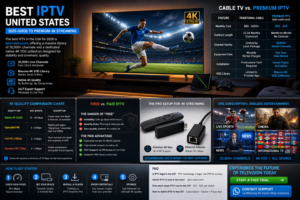
iptv united states
Many US consumers are hesitant to leave cable due to perceived reliability. However, the value proposition has shifted dramatically.
| Feature | Traditional Cable | Premium IPTV (iptv-usatv.com) |
|---|---|---|
| Monthly Cost | $80 – $150+ | |
| Contract Length | 12-24 Months (Common) | Month-to-Month / No Contract |
| Channel Variety | Limited by Local Package | 20,000+ Global Channels |
| Equipment Fees | Monthly Rental Charges | Use Your Own Device |
| Installation | Professional Tech Required | Instant Digital Activation |
| VOD Library | Limited to Provider App | Massive 4K VOD Collection |
Many providers claim “4K,” but they are often providing “Upscaled 4K” (HD content stretched to fit a 4K screen). To help you understand what you are paying for, refer to this benchmark chart.
| Quality Tier | Avg. Bitrate | | :— | :— | :— | | Native 4K (UHD) | 15 – 25 Mbps | Crystal clear, fine detail in textures, no pixelation | | Upscaled 4K | 5 – 8 Mbps | Slightly soft edges, “digital look,” resembles high-end 1080p | | Full HD (1080p) | 3 – 5 Mbps | Clear, but lacks the depth and crispness of UHD | | Standard HD (720p) | 2 – 3 Mbps | Visible compression during fast motion (sports) |
Why this matters: A premium service like iptv-usatv.com invests in high-bitrate servers to provide native 4K, ensuring that your high-end OLED or QLED TV is actually being utilized.
If you search for “best IPTV service 2026 Reddit,” you will find a constant battle between those promoting free M3U lists and those recommending paid services.
Free IPTV lists are often scraped from public forums. They suffer from three primary flaws:
Paid services provide dedicated server infrastructure, customer support via WhatsApp, and guaranteed uptime. When you pay for a premium subscription, you are paying for the CDN (Content Delivery Network) that prevents the server from crashing during major events like the Super Bowl or World Cup.
When evaluating providers, do not look at the channel count alone—most claim 10,000+. Instead, look at these three metrics:
Setting up your premium service is straightforward if you follow these steps:
IPTV technology itself is entirely legal. The legality depends on the content being streamed and whether the provider has the rights to distribute it. Users are encouraged to use VPNs to ensure their privacy and security while streaming.
Based on stability, channel variety (20,000+), and native 4K support, iptv-usatv.com is currently the top-rated choice for US-based users seeking a premium, no-buffering experience.
Prices vary depending on the subscription length. Typically, premium services range from $10 to $25 per month, offering a fraction of the cost of traditional cable while providing significantly more content.
To watch, you need three things: a subscription (which provides an M3U link or Xtream Codes), a compatible device (like a Firestick or Android Box), and a media player app (like TiviMate).
Stop settling for limited channel packages and expensive contracts. With over 20,000 channels and a world-class 4K VOD library, the era of traditional cable is over.
Ready to upgrade your home cinema?