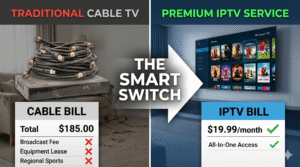
Are you tired of staring at a cable bill that seems to increase every single month? Between hidden equipment fees and expensive “bundles” full of channels you never watch, traditional TV has become a financial burden. There is a better way to get your favorite shows, local news, and live sports without the corporate price tag.
IPTV, or Internet Protocol Television, is the modern solution. Instead of relying on a clunky satellite dish or a coaxial cable wired into your wall, IPTV delivers television content directly to your device via your internet connection. This shift in technology means you get more content, higher quality, and significantly lower costs.
Whether you are a die-hard NFL fan, a movie buff, or someone who just wants a reliable way to watch the evening news, switching to a premium IPTV subscription is the smartest move you can make for your home entertainment.
At its core, IPTV is exactly what the name suggests: television delivered over the Internet Protocol. While traditional cable sends signals through a dedicated cable line, IPTV uses the same data packets that power your web browsing and email to stream video.
When you use a professional IPTV service, you aren’t just getting a linear stream of channels. You generally get three types of content:
To understand why IPTV is so dominant in 2026, it helps to look at where it started. In the early 2000s, IPTV was primarily a tool for large telecommunications companies. They offered “Triple Play” packages (internet, phone, and TV) to compete with cable giants. These early versions were restrictive; you were tied to one provider and one specific set-top box.
As broadband speeds increased and Wi-Fi became the standard in every American home, the technology evolved. The arrival of high-speed fiber optics and 5G removed the buffering issues that plagued early streaming.
By the mid-2010s, the rise of “OTT” (Over-the-Top) services shifted the power to the consumer. People realized they didn’t need a telecom contract to get TV; they just needed a compatible app and a subscription. This led to the birth of the flexible, third-party IPTV subscriptions we use today, allowing users to bring their favorite content to any device, regardless of their internet service provider.
If you are still paying for a traditional cable package in the USA, you are essentially paying for technology from the 1990s. The value proposition of an IPTV subscription is simply unbeatable when compared side-by-side.
| Feature | Traditional Cable TV | Premium IPTV Service |
|---|---|---|
| Monthly Cost | High ($100 – $200+) | |
| Contracts | Often 1-2 year commitments | |
| Installation | Requires professional technician | |
| Hardware | Expensive leased boxes | |
| Channel Count | Limited to bundle packages | |
| Portability | Tied to your home address | |
| Content | Standard HD/4K | |
| VOD | Limited to provider library |
The Biggest Advantages:
Ready to stop overpaying? [Start your free trial] and see the difference today.
Not all providers are created equal. To ensure you are getting a premium experience, you need to look for specific features that separate the professionals from the amateurs.
A top-tier service should provide a comprehensive list of IPTV USA channels. This includes:
There is nothing worse than a pixelated screen during the final minutes of a championship game. The best services offer streams in HD and 4K. By utilizing advanced compression technology, they deliver a crisp image without requiring an industrial-grade internet connection.
Your subscription should be a one-stop shop. A high-quality provider integrates a VOD section featuring thousands of the latest cinema releases and trending series. Instead of paying for five different streaming apps, you have everything in one interface.
While no service can guarantee “100% no buffering” (as that depends on your own internet speed), a professional provider uses anti-freeze technology and load-balanced servers. This ensures that even during high-traffic events—like the Super Bowl—your stream remains stable.
One of the best things about IPTV is that you don’t need to buy expensive new hardware. You likely already own a device that can handle it.
The Firestick is the most popular choice for IPTV in the USA. It is affordable, small, and perfectly compatible with almost all IPTV apps. Because it runs on a version of Android, it allows for easy sideloading of the software you need.
If you have a Sony or Hisense Android TV, or an Nvidia Shield, you have the most powerful IPTV experience possible. These devices handle 4K content with ease and offer the smoothest user interface.
Most modern Smart TVs have app stores that support IPTV players. While slightly more limited than the Firestick, they allow you to keep your setup clean without extra dongles.
For those in the Apple ecosystem, the Apple TV app store offers several high-quality players. Similarly, you can install IPTV apps on your iOS or Android phone to take your TV on the go.
If you aren’t sure which app to use, IPTV Smarters is widely regarded as the best all-around player. It organizes your channels, VOD, and series into a professional, easy-to-navigate layout that looks just like a premium cable interface.
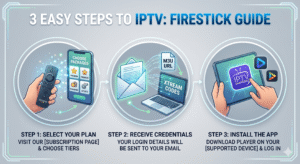
Getting started takes less than five minutes. You don’t need to be a tech genius to get your system running.
Step 1: Choose Your Plan Visit our website, select the subscription plan that fits your needs (Monthly, Quarterly, or Yearly), and complete the checkout.
Step 2: Receive Your Credentials Almost instantly, you will receive an email containing your login details. This usually includes a username, password, and an M3U URL or Xtream Codes API link.
Step 3: Install and Activate Download your preferred app (like IPTV Smarters) on your Firestick or Smart TV. Enter your credentials, and your full channel list will automatically load.
Get instant access to thousands of channels—[Get started now]!
This is a question we hear often. To be clear: IPTV technology itself is 100% legal. It is simply a method of delivering video via the internet, just like YouTube, Hulu, or Netflix.
However, the legality of the content depends on the provider. Some services provide access to content they do not own the rights to. To stay safe and ensure a high-quality experience, we recommend the following:
With so many options available, it can be hard to tell the difference between a premium service and a low-quality one. Use this checklist before you pay for any subscription:
There has never been a better time to cut the cord. By switching to a professional IPTV service, you are choosing more content, better quality, and massive monthly savings. You no longer have to settle for the limited bundles offered by cable companies or jump between five different streaming apps to find something to watch.
From the adrenaline of live NFL games in 4K to the comfort of an endless movie library, everything you want is just a few clicks away. Why keep paying for the past when you can embrace the future of television?
Stop overpaying today. Join thousands of happy viewers across the USA and experience the best in streaming.
[Get your IPTV free trial today]
For most users, the Amazon Firestick is the best choice because it is affordable, easy to set up, and compatible with almost every IPTV app. For power users who want the absolute best performance and 4K stability, the Nvidia Shield is the top recommendation.
Yes. To stream content in 4K without buffering, we typically recommend a stable connection of 25Mbps or higher. For HD streaming, 10-15Mbps is usually sufficient. You can test your speed at sites like Fast.com to be sure.
This depends on the specific plan you choose. While some basic plans are limited to one device at a time, we offer multi-device options that allow you to watch in the living room and the bedroom simultaneously.
An M3U playlist is essentially a text file or a URL link that contains the addresses of the TV channels. Instead of adding 20,000 channels manually, you simply paste the M3U link into your IPTV app, and it automatically builds your channel guide.
Choosing a USA-focused service ensures you get the specific local channels, regional sports networks, and major US leagues (like the NFL and NBA) that you care about, all while avoiding the exorbitant costs of traditional American cable providers.