
Are you tired of opening your monthly cable bill only to find new ‘broadcast fees’ and ‘regional sports surcharges’ that you never agreed to? You aren’t alone. Millions of Americans are cutting the cord to escape overpriced contracts and limited channel packages.
IP television is the modern answer to this frustration. Instead of relying on a bulky cable box or a satellite dish on your roof, you can now access thousands of channels directly through your internet connection. It is faster, cheaper, and far more flexible.
In this comprehensive guide, we will show you exactly how it works, why it is the superior choice for US viewers, and how to set up the best IPTV service on your favorite devices.
At its simplest, ip television (or IPTV) stands for Internet Protocol Television. While traditional TV sends signals through coaxial cables or satellite beams, IPTV delivers television content over your existing broadband internet connection.
Think of it like Netflix or YouTube, but for live television. Instead of a scheduled broadcast that you have to tune into at a specific time, the data is sent in ‘packets’ of information, allowing for a more interactive experience.
When you get an IPTV subscription, you typically get access to three types of content:
Not all services are created equal. To get the most out of your entertainment, you should look for a premium provider that offers high-end stability and a massive library.
Here is what a top-tier IPTV USA service provides:
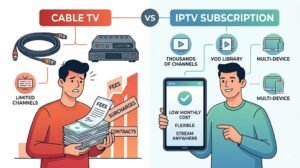
Why are so many people ditching Xfinity, Spectrum, and Cox? The answer is simple: value. Cable companies lock you into long-term contracts and charge you for “bundles” containing channels you never watch.
IP television flips the script. You only pay for the service, with no hidden hardware rental fees or installation costs.
The Big Wins for Cord-Cutters:
FeatureTypical US Cable PackagePremium IPTV SubscriptionMonthly Cost$120 – $200+$15 – $30Contract Length12-24 Months (Common)No Contract / MonthlyChannel Count150 – 300 Channels10,000 – 20,000+ ChannelsVOD LibraryLimited to ProviderMassive (Thousands of titles)Hardware Fees$10 – $20 per box/mo$0 (Use your own device)
Setting up your service is surprisingly easy. You don’t need to be a tech genius to get started. Here is the simple process to get your favorite channels running in minutes.
Research and select a reliable provider. Look for one that offers an IPTV free trial so you can test the channel list and streaming quality before committing.
Once you sign up, your provider will send you login details. These usually come in the form of an M3U URL or Xtream Codes API (a username, password, and server URL).
You need a “player” to view the content. One of the most popular choices is IPTV Smarters. This app acts as the interface for your subscription.
Open the app and enter your M3U link or Xtream Codes. The app will then automatically download the channel list and the EPG guide.
That’s it! You can now browse through categories like “US Local,” “Sports,” or “Movies” and start streaming.
Because IPTV runs over the internet, it works on almost any device with a screen:
The technology behind streaming has evolved rapidly. In 2026, we are seeing a shift from simple “channel lists” to fully integrated entertainment hubs.
AI-Driven Personalization Modern services now use AI to analyze your viewing habits. Instead of scrolling through 20,000 channels, your dashboard now highlights the specific NBA or NFL games you follow, based on your favorite teams.
8K Stability and Low-Latency While 4K is now the standard, 8K streaming is becoming a reality for high-end displays. New codecs have reduced the bandwidth needed, meaning ultra-high-definition content is more stable than ever, even on mid-range internet connections.
Smart Home Ecosystem Integration IPTV is no longer just about the TV. It now integrates deeply with smart home hubs. You can use voice commands via Alexa or Google Home to “Switch to ESPN” or “Find the latest Marvel movie,” and your service will launch the stream instantly across any room in your house.
With so many options available, it can be overwhelming. To avoid scams or poor-quality streams, keep these three criteria in mind:
If you are looking for the best IPTV service tailored for the US market, look no further than iptv-usatv.com. We focus on high-uptime servers, an exhaustive list of US local channels, and instant activation to get you watching immediately.
There has never been a better time to leave the cable company behind. IP television offers a level of freedom, variety, and affordability that traditional TV simply cannot match. From the ability to watch your favorite US sports in 4K to the convenience of having a global cinema in your pocket, the benefits are undeniable.
Stop paying for channels you don’t watch and contracts you hate.
Ready to experience the future of TV?
[Start your free trial today] and [Watch your favorite channels today] with the most reliable IPTV service in the USA.
Is IP television legal? IPTV technology itself is completely legal. It is simply a method of delivering TV over the internet. However, the legality of the content depends on the provider. To stay safe, always choose a reliable provider and use a VPN to protect your privacy.
Do I need a VPN for IPTV? While not strictly required for the service to work, we strongly recommend using a VPN. A VPN hides your streaming activity from your Internet Service Provider (ISP), preventing them from “throttling” (slowing down) your connection when they detect high-bandwidth streaming.
What is the minimum internet speed required for 4K streaming? For a stable 4K experience, we recommend a minimum download speed of 25 Mbps. For HD streaming, 10-15 Mbps is usually sufficient. You can check your speed at fast.com to see if your connection is ready.
Can I use one subscription on multiple devices simultaneously? This depends on your plan. Many providers offer “Multi-room” or “Multi-connection” packages that allow you to watch on 2, 3, or 5 devices at once. Check your subscription details to see how many concurrent connections are allowed.
What is an M3U playlist? An M3U playlist is a simple text file that contains a list of links to the streaming channels provided by your IPTV service. When you upload this file into an app like IPTV Smarters, the app reads those links and turns them into the clickable channel list you see on your screen.